How to Get Discovered
A step-by-step guide to making your tools findable by consumers and AI agents on SettleGrid.
Step 1
Enable Your Public Profile
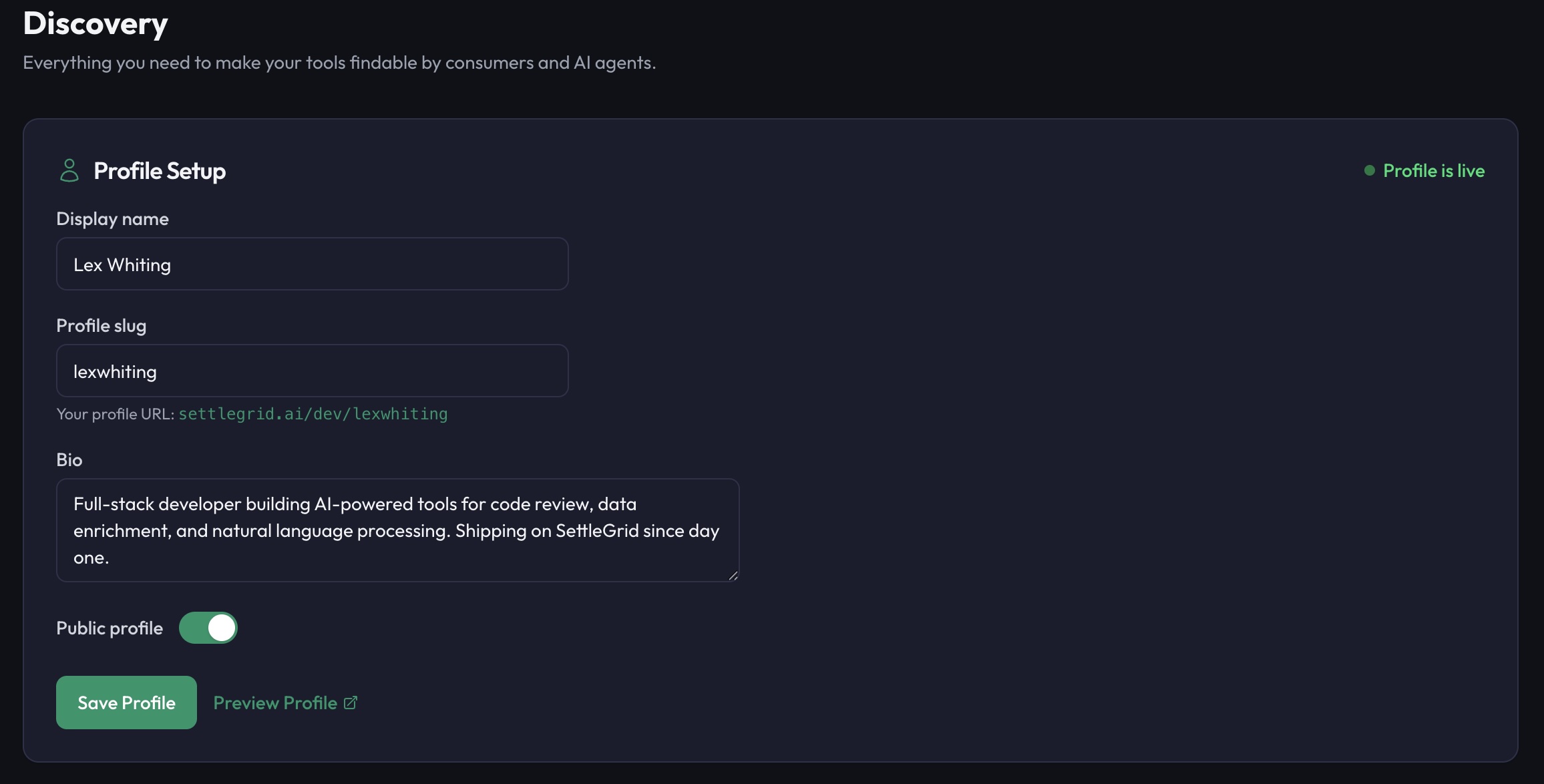
Your developer profile is the foundation of your presence on SettleGrid. It is the page consumers and agents land on when they want to see who you are and what you have built.
- Go to Settings → Profile in your dashboard
- Set a memorable slug (e.g.,
lexwhiting) — this becomes your permanent URL - Write a bio describing what you build and the problems your tools solve
- Toggle publicProfile on
Your profile URL
settlegrid.ai/dev/{slug}
Example: settlegrid.ai/dev/lexwhiting
Step 2
Publish Active Tools
Tools in draft status are invisible to the outside world. Only active tools appear in the Showcase, Discovery API, and agent queries.
- Set your tool status to active to appear in the Showcase
- Add a category and tags — these power search and filtering
- Write a clear, concise description — this is what consumers see first
- Include pricing information so consumers know what to expect before they integrate
Good description vs. bad description
Bad: "My web search tool"
Too vague. Consumers and agents cannot determine what this does or why it is better.
Good: "Web search with structured JSON output, source attribution, and freshness scoring. Returns the top 10 results with title, snippet, URL, and publish date."
Specific, scannable, and tells consumers exactly what they get.
Step 3
Add Badges to Your README
Badges on your GitHub README create inbound links to SettleGrid and signal to developers that your tool is professionally monetized. Every badge links back to settlegrid.ai.
Powered by SettleGrid
Tool badge
Shows your tool name and current status. Replace {slug} with your tool slug.
Developer badge
Shows your developer profile and reputation tier. Replace {slug} with your developer slug.
Step 4
Leverage the Discovery API
Once your tool is active, it is automatically included in SettleGrid's discovery infrastructure. No action needed on your part — publishing an active tool means automatic inclusion.
Discovery API
Your tools are queryable via GET /api/v1/discover. Third-party directories, IDE plugins, and integrations can search and embed your tools.
MCP Discovery Server
AI agents using the MCP Discovery Server can find your tools by capability, category, or name. When an agent needs a tool, your active listing surfaces automatically.
Showcase
The SettleGrid Showcase is the public catalog of all active tools. It supports full-text search, category filtering, and sorting by reputation, price, and recency.
Step 5
Build Your Reputation
SettleGrid assigns reputation tiers to developers based on the quality and reliability of their tools. Higher reputation means higher ranking in the Showcase and Discovery API.
| Tier | Requirement | Benefit |
|---|---|---|
| Bronze | Profile complete, 1+ active tool | Listed in Showcase |
| Silver | 95%+ uptime, positive reviews | Priority ranking in search |
| Gold | 99%+ uptime, 3+ tools, strong reviews | Featured in Showcase, Discovery API boost |
| Platinum | Top-tier uptime, high volume, excellent reputation | Homepage feature, premium badge, agent priority |
Reputation Factors
- Uptime — consistent availability is the single biggest factor
- Response time — faster tools rank higher
- Consumer reviews — respond to reviews to show you are engaged
- Tool count — more active tools signal a serious developer
Your developer profile at settlegrid.ai/dev/{slug} is a public, linkable page that showcases all your active tools, reputation tier, and bio. Treat it as your professional identity in the AI tool economy.
- Social media — share your profile on X/Twitter, LinkedIn, and Bluesky
- GitHub — link from your GitHub profile README and repository descriptions
- Personal site — add a "My AI Tools" section that links to your SettleGrid profile
- Blog & content — reference your tools and profile in technical blog posts
- Conference talks — include your profile URL on slides when presenting
- API documentation — link to your SettleGrid profile as the canonical source for your tools
Quick links to share
Profile: settlegrid.ai/dev/{slug}
Tool page: settlegrid.ai/tools/{tool-slug}
Ready to get discovered?
Complete your profile, publish your tools, and let SettleGrid's discovery infrastructure do the rest.